
Reply in form-question and AML/KYC threads
Discover an existing conversation on a form question or AML/KYC document and append a reply.
Before you start: complete the authentication and TypeScript client setup in Commenting before running these examples.
Reply workflow
Besides general threads, Anduin also returns threads attached to:
- A subscription-form question, with
anchor.subType: "formQuestion". - An AML/KYC document, with
anchor.subType: "amlKycDocument".
These threads are created inside the Anduin application when someone comments on that form question or document. The API cannot create them — CreateOrGetCommentThread creates general threads only. The API can discover these threads and reply to them. The workflow first finds an existing thread, optionally reads its context, and then imports a reply:
- Discover the thread. Call ListCommentThreads and keep threads whose
anchor.subTypeisformQuestionoramlKycDocument.anchorResourceIdidentifies the order, and the anchor's other fields tell you which form question or document the conversation is about. - Read the context (optional). Call ListThreadComments with the discovered
threadIdto see the conversation so far before responding. - Reply. Call ImportComments on that
threadId, following the same request pattern described in Import comments from your external system. The reply is appended to the existing conversation and appears in the application on that question or document.
Replies are authored by your service account. Use onBehalfOf for display attribution and notifyMode to control notifications, as described in Import comments from your external system.
You can reply into a form-question or AML/KYC thread only when:
- The thread already exists in Anduin.
- ListCommentThreads returns its
threadId. - Your service account can post to its visibility tier.
If nobody has commented on the question or document in the application yet, the thread does not exist and there is nothing to reply to.
Worked example: answer an investor's form question
In the Anduin application, the investor commented on subscription-form question 1 ("Registration Name(s) in Which Investment Should Be Held"). Her relationship manager answers from the external CRM through the API.
Step 1 — discover the thread by filtering the fund's threads on anchor.subType:
const fundId = "YOUR_FUND_ID";

const { data: page, error } = await client.GET("/api/v1/fundsub/{fund-id}/comment-threads", {
  params: { path: { "fund-id": fundId }, query: { limit: 200 } },
});
if (error) throw new Error(JSON.stringify(error));

const appThreads = page.threads.filter(
  (t) => t.anchor.subType === "formQuestion" || t.anchor.subType === "amlKycDocument",
);
The discovered thread — its anchor tells you exactly which question the conversation sits on:
{
  "threadId": "txnoo7ed9y1mzrwy.offis00.isuvz3vl2",
  "anchorResourceId": "txnoo7ed9y1mzrwy.fsb4x2o.lpp9lq1n0o",
  "anchorResourceType": "Order",
  "anchor": {
    "subType": "formQuestion",
    "formVersionId": "forocr00000000000002.fveversio0.lfv81kl0gn",
    "fieldAlias": "entityname",
    "tableOfContentTitle": "Section I - General Information",
    "description": "1. Registration Name(s) in Which Investment Should Be Held (“Subscriber”)"
  },
  "visibility": "shared",
  "status": "open"
}
Step 2 (optional) — read the conversation so far with ListThreadComments before responding.
Step 3 — reply with ImportComments, addressed to the discovered threadId:
const { data: result, error: importError } = await client.POST(
  "/api/v1/fundsub/{fund-id}/comment-threads/{thread-id}/comments",
  {
    params: {
      path: { "fund-id": fundId, "thread-id": "txnoo7ed9y1mzrwy.offis00.isuvz3vl2" },
    },
    body: {
      notifyMode: "inApp",
      comments: [
        {
          body: "Hi Virginia — please use the family trust, exactly as it is registered with us: \"Lee Family Trust\". We'll sync the final registration name back to the CRM once the trust paperwork completes.",
          onBehalfOf: "Jordan Lee (External CRM)",
          externalRef: "crm-comment-2049",
        },
      ],
    },
  },
);
Response:
{
  "threadId": "txnoo7ed9y1mzrwy.offis00.isuvz3vl2",
  "commentIds": ["txnoo7ed9y1mzrwy.offis00.isuvz3vl2.dcmjyjyqrz4oz"]
}
The reply lands inside the conversation on that exact form question. This is what the investor sees when opening the question in the form:
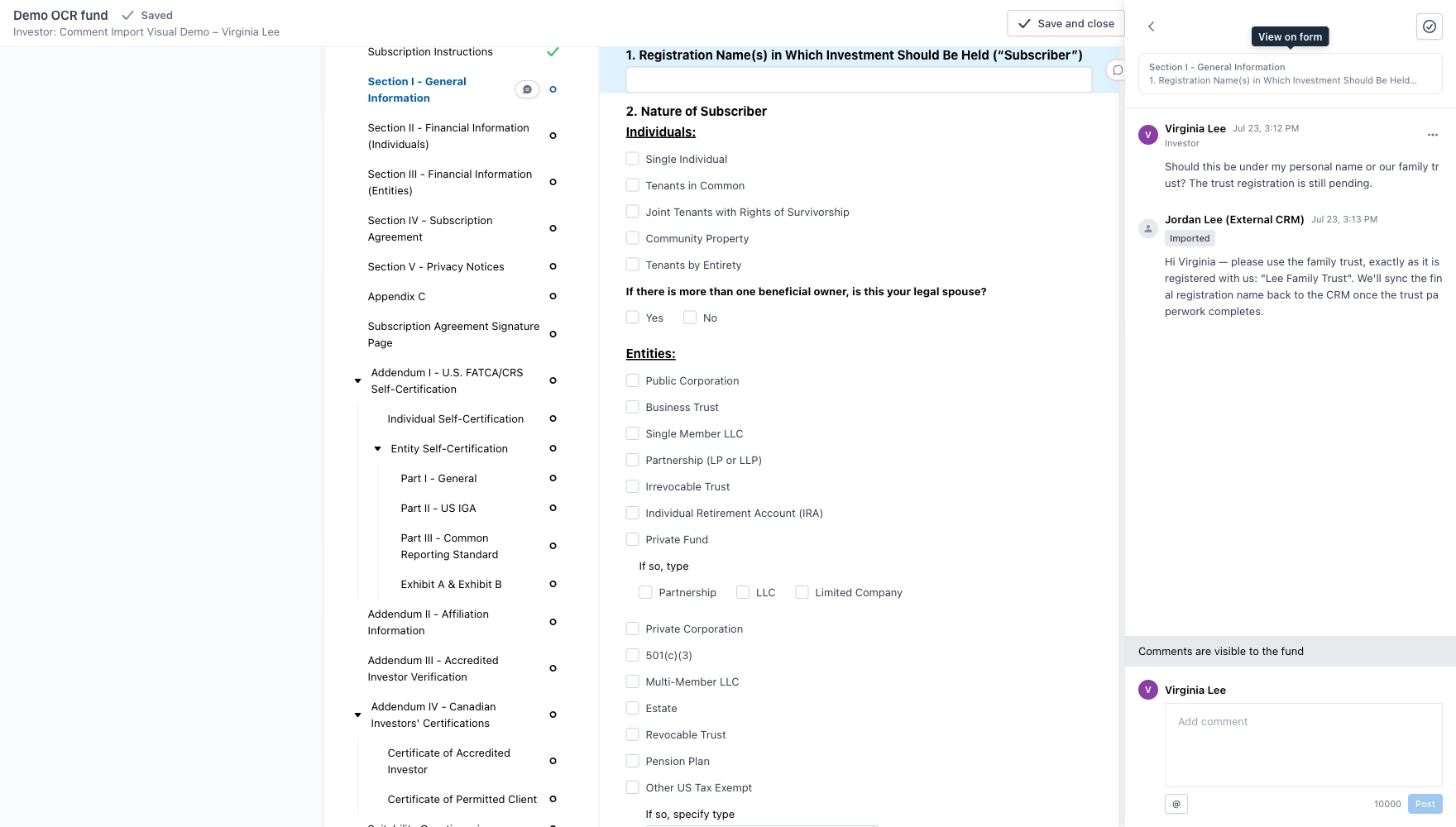
The investor's own comment and the imported reply sit in the same shared thread, anchored to that one form question.
The same pattern works for AML/KYC document threads. Here a CRM compliance note has been imported into the fund team's internal W-9 conversation, as the fund manager sees it:
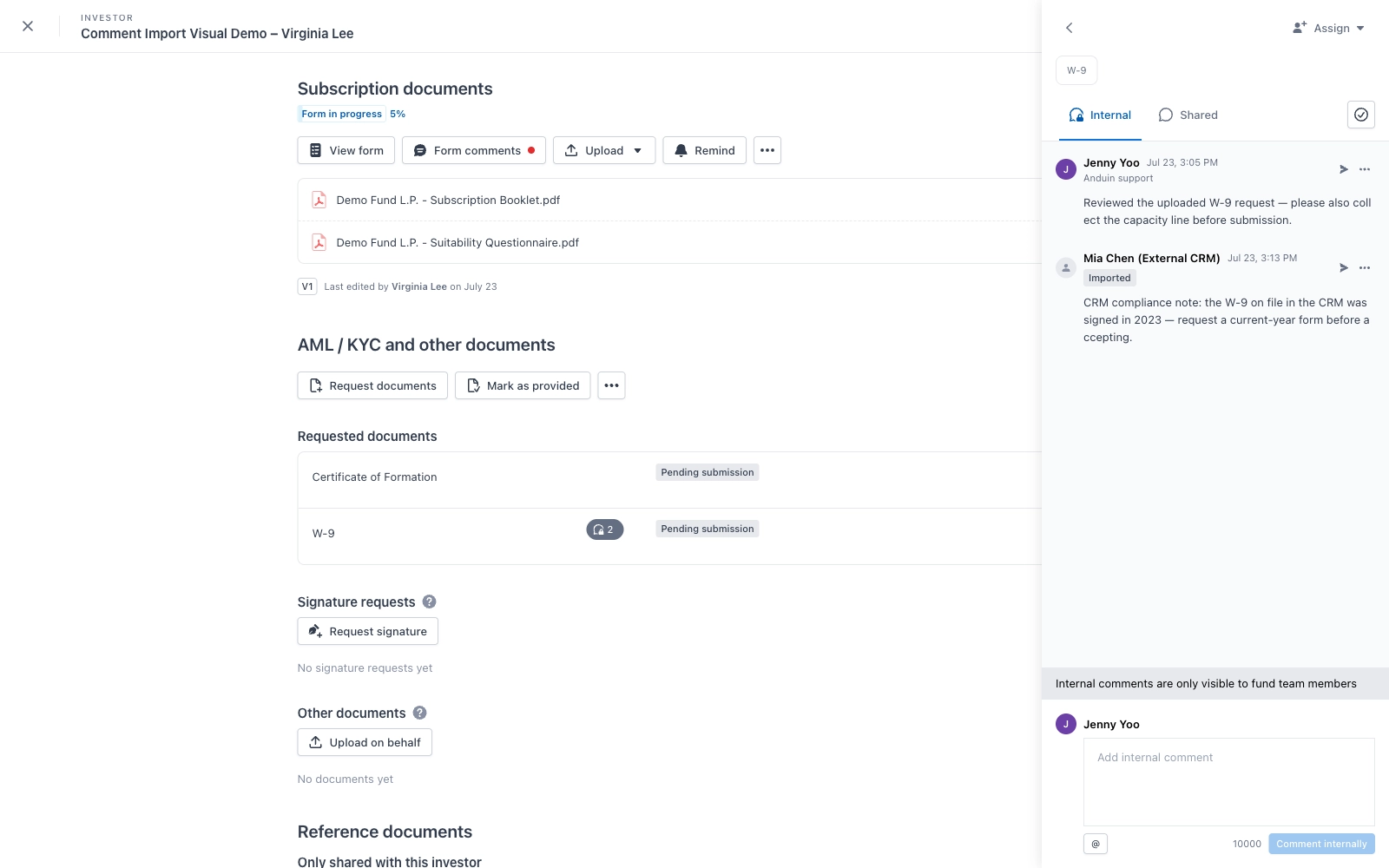
Because this thread is internal, the note stays with the fund team — the investor never sees it.
For a first import implementation, route external-system comments to the appropriate internal or shared general thread as described in Import comments from your external system. Do not construct a specific threadId or anchor yourself.
Limits and pagination
- List endpoints return 50 records by default and support a maximum
limitof 200. - Follow
nextCursoruntilhasMoreisfalse. - Keep the same
anchorResourceIdfilter when following a cursor from a filtered request. - A synchronous import accepts 1–100 comments.
- A comment can contain up to 10,000 stored characters.
- A thread can contain up to 200 comments.
Treat cursors, thread IDs, and comment IDs as opaque values.
Troubleshooting
The thread cannot be found
Form-question and AML/KYC threads must first be created by a comment in the Anduin application. If no one has started the conversation, ListCommentThreads has no thread to return and the API cannot create one.
The API returns 403
Confirm that the API service account can post to the thread's visibility tier. Internal and shared threads can require different permissions.
The API returns 404 for a thread
Confirm that the threadId belongs to the fund in the request URL. Thread IDs cannot be used across funds.
A reply may have timed out
Do not send the same request again immediately. Call ListThreadComments and compare externalRef values to determine whether the reply arrived.
The API says comment import is not available
Contact your Anduin customer success representative to confirm that the Comment API is enabled for the fund.
Endpoints used
All paths below are relative to /api/v1/fundsub.
| Operation | Method and path | Purpose |
|---|---|---|
| ListCommentThreads | GET /{fundId}/comment-threads | Discover existing form-question and AML/KYC threads. |
| ListThreadComments | GET /{fundId}/comment-threads/{threadId}/comments | Read the existing conversation before replying. |
| ImportComments | POST /{fundId}/comment-threads/{threadId}/comments | Append a reply to an existing thread. |
Updated 3 months ago